For Developers · Monetization & Growth
Contributors
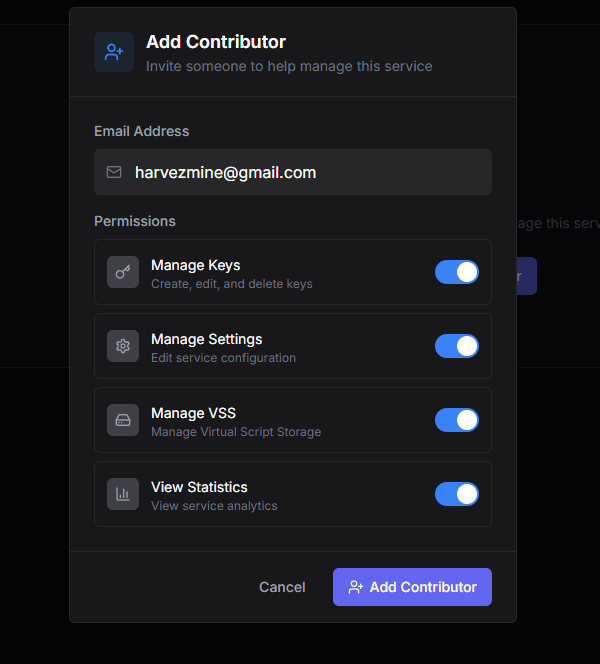
Contributors lets you give other people personal access to your service with a customized permission set. A contributor can manage keys, manage settings, manage VPS, or view statistics — whatever combination you grant. This is how you bring in trusted team members without sharing your full account credentials.
What contributors can do
Each contributor gets any combination of independent permissions when you add them:
- Manage Keys — create, edit, delete keys; change their status; reset HWIDs; run bulk operations. Use for support staff who handle user issues.
- Manage Settings — edit service configuration, security, monetization, appearance. Use for technical partners who help you tune the service.
- Manage VPS — control VPS-related infrastructure tied to your service. Use for DevOps-style collaborators.
- View Statistics — read-only access to analytics and performance data. Use for marketing or community-management people who need numbers without write access.
Principle of least access
Adding a contributor
Click the add button on the Contributors page, enter the collaborator's Panda Auth username (they need their own Panda Auth account already), and tick the permissions you want to grant. Save, and they show up under your service immediately — they will see your service in their own dashboard with the permissions you assigned.
Removing or changing access
You can edit a contributor's permissions at any time without removing and re-adding them. Toggle individual permissions on or off, save, and the change takes effect on their next request.
Removing a contributor fully revokes their access — they lose the service from their dashboard, their saved sessions for it are invalidated, and they can no longer take any action on your service. Use this when a collaboration ends or you suspect their account has been compromised.
Contributors are not owners