For Developers · Dashboard
URL Shortener
The URL Shortener turns any link into a monetized booster link — the same checkpoint-and-ad flow your get-key page uses, but pointed at any destination you choose. Use it to monetize file downloads, external content, partner links, anything you want to gate behind ad completion. Visitors clear checkpoints to reach the destination; you collect the ad revenue.
What it's for
The classic example: you have a download link for something — a script file, a mod, an executable, a guide — and you want users to go through the same monetization flow they would for a key before reaching it. URL Shortener wraps that download link in a Panda Auth checkpoint flow. Users hit the short URL, complete the checkpoints, and land on the destination.
Anything you can link to can be monetized this way:
- File downloads — script files, mods, guides, executables, ZIPs.
- External content — your YouTube video, a Discord invite, a partner page, a documentation site.
- Affiliate links — gate access to a referral or affiliate landing page through your own checkpoint flow.
- Backup distribution links — content you want to monetize separately from your primary get-key flow.
How it works
You provide a destination URL — anywhere on the internet, no restrictions. Panda Auth generates a short URL of the form shrt.pandauth.com/shrt/your-alias that wraps the destination in a checkpoint flow. When users click the short URL, they hit a checkpoint page first; once they complete the required steps, they're redirected to the destination URL.
Each shortener you create has its own configuration:
- Destination URL — where users end up after completing checkpoints.
- Alias — the short suffix on the URL (auto-generated or custom).
- Checkpoint count — how many steps users must clear before reaching the destination.
Monetization on shortener links
Shorteners use the same ad providers as your get-key flow. The Revenue Settings you configured in Monetization apply across both your get-key page and your shortener checkpoints — one configuration, two revenue surfaces.
Effective use
Managing shorteners
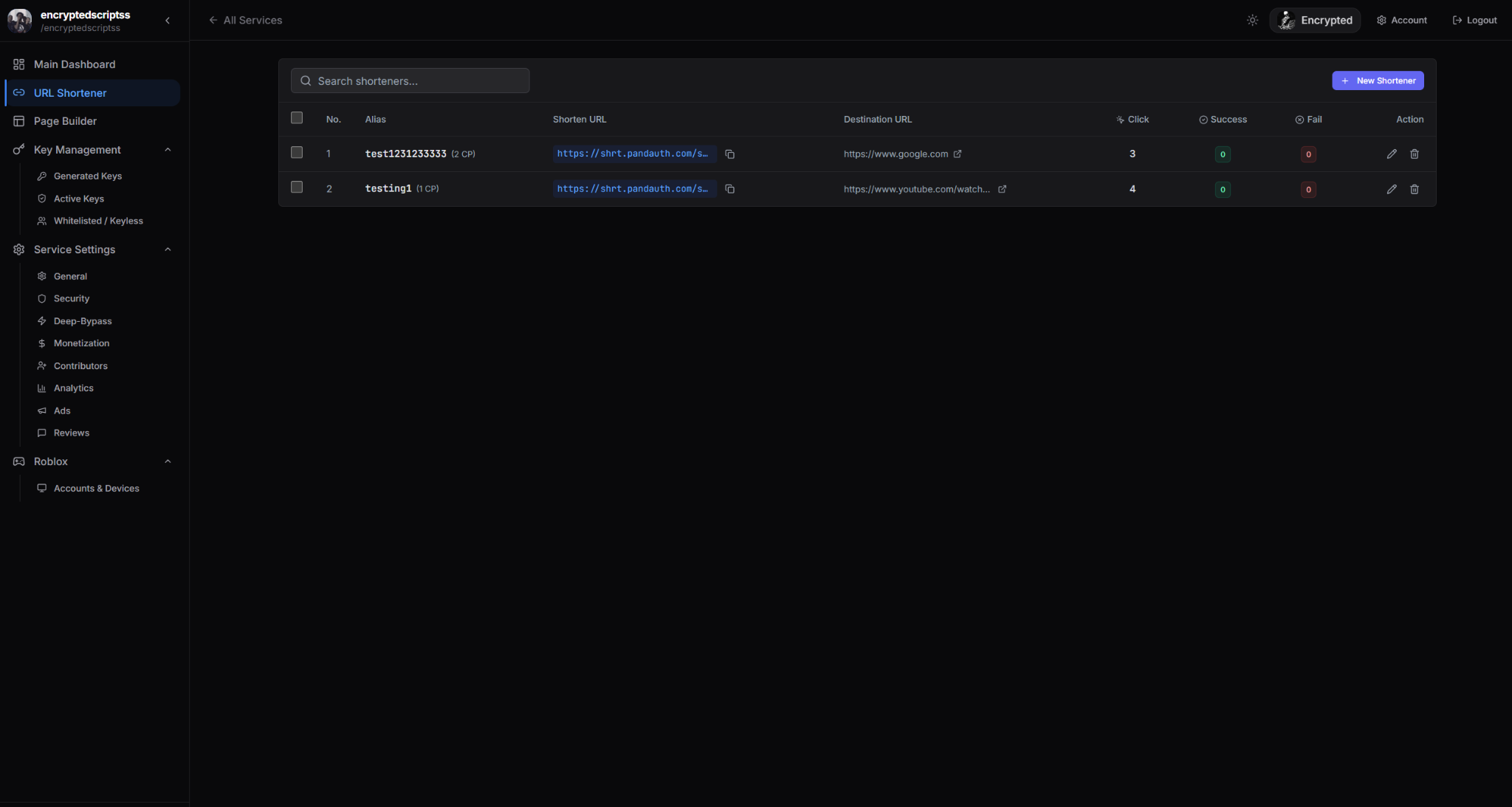
The URL Shortener dashboard lists every shortener you've created with searchable filtering. Each row shows:
- Alias — the short URL suffix.
- Shorten URL — the full short URL, with a copy button.
- Destination URL — where users end up.
- Click count — total clicks on the short URL.
- Success count — users who completed all checkpoints and reached the destination.
- Fail count — users who started but didn't complete.
From the row actions you can edit, delete, or bulk-delete shorteners.
When to use it