For Developers · Dashboard
Deep Bypass
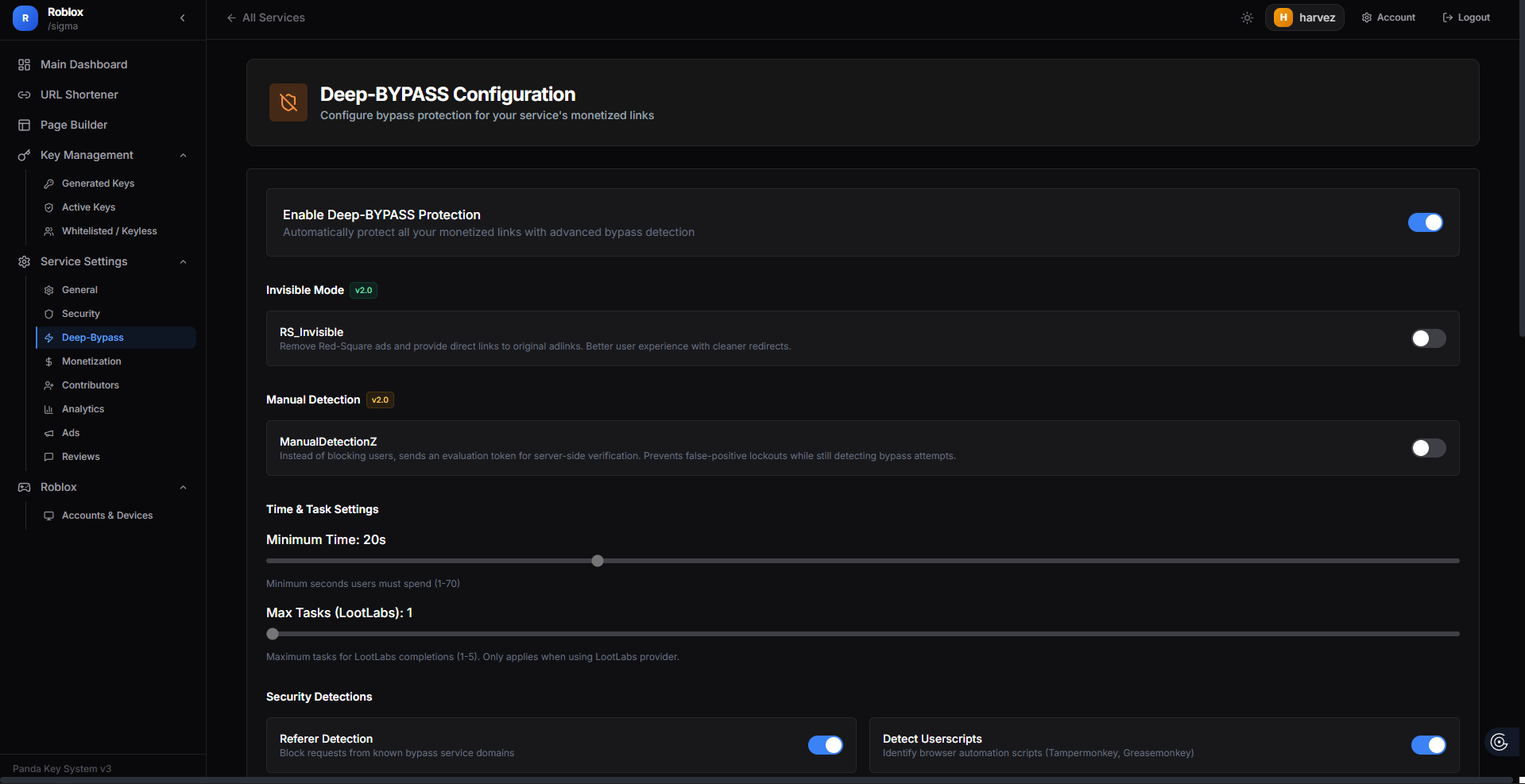
Deep Bypass is one of our most advanced anti-bypass features, built for developers who refuse to let their checkpoint flow be bypassed by Chrome extensions, userscripts, or specialty bypass tools. We collaborated with the Deep Bypass team to add a layer of protection that goes far beyond standard adblock detection — so you can maximize revenue without worrying about the bypass-tool arms race.
Why Deep Bypass exists
Bypass methods have evolved fast. A Chrome extension that automatically completes Linkvertise checkpoints is something a user can install in five seconds, and traditional protections (basic adblock detection, simple checksum validation) cannot catch it because the extension acts after the page loads and pretends to be a legitimate user. Specialty tools like userscripts, bypass services, and headless browser farms add layers on top of that.
Deep Bypass tackles the problem at a different level — it monitors visitor behavior, browser internals, and completion patterns that bypass tools cannot easily fake. When a bypass tool tries to spoof completion, Deep Bypass catches the inconsistency and either blocks the user, drops them into a fallback flow, or flags them for additional friction.
What you can configure
The Deep Bypass tab has multiple categories of settings. Tune each to match how aggressively you want to defend your service.
Invisible Mode
Runs all detections silently in the background. Bypass tools think they succeeded — the page accepts their fake completion — but Panda Auth invalidates the result on the backend without telling the bypass tool why. The user gets stuck in a loop and eventually gives up; the bypass tool author never gets a clear error message to debug against.
Time and Task Settings
Controls how long a user must spend on a checkpoint before completion counts, and what activity Deep Bypass expects to see during that time. Bypass tools tend to skip directly from "page loaded" to "checkpoint complete" in milliseconds — Deep Bypass measures the gap and rejects unrealistic timing.
- Minimum Time — minimum seconds before a checkpoint can be marked complete. 15–25 seconds is the sweet spot for most flows.
- Maximum Tasks — caps the number of tasks Deep Bypass requires a user to clear, useful when balancing protection against user friction.
Security Detections
A set of toggles for specific bypass techniques. Each detection catches a different category of bypass tool:
- Referer Check — verifies the user came from a legitimate referer, not a direct API call.
- Userscript Detection — flags userscript managers (Tampermonkey, Greasemonkey) when active.
- AdBlock Detection — flags users running ad blockers (independent of the simpler Block AdBlock toggle in Security → Protection).
- Unicode Detection — catches bypass tools that inject zero-width or invisible Unicode characters to spoof input.
- Spoof Completion — detects when a "completed" event was triggered programmatically rather than from a real user action.
Bypass Service Presets
Pre-built detection profiles for known bypass services. Toggle on the ones you want to actively block. Updated regularly as new bypass services appear.
Revenue Booster
A set of opt-in settings that increase ad payout at the cost of tighter user filtering:
- Block VPNs — rejects VPN traffic entirely.
- Block Incognito — rejects private/incognito browser sessions.
- Block Ad-Blockers — harder version of the standard adblock toggle.
- Extra Wall — adds an additional verification gate.
- Captcha Required — forces captcha even when other layers would allow passthrough.
- Revenue Forcer — disables the "Skip Ads" option on Linkvertise (~+30% CPM, Linkvertise-only).
Fallback Mode
Instead of hard-blocking a flagged user, Fallback Mode quietly redirects them to re-attempt the checkpoint. This is gentler than a hard block — legitimate users who got falsely flagged (false positives) get another chance, while bypass tools end up in an infinite loop they cannot escape.
Maximum protection setup
Test after every change